Facebook Video Downloader
Download Facebook videos, reels, stories, photos and audio in HD MP4 or MP3. FB DownS is a free, fast Facebook video downloader — just paste a link, no login or app required.
HD Quality100% Free & SafeMP4 & MP3
How does it work?How to Use the FB Video Downloader in 3 Easy Steps
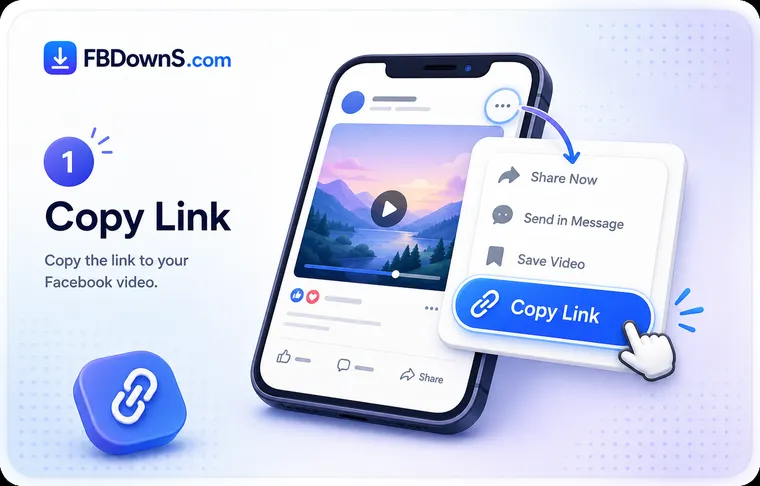
Step 1: Copy Facebook Content Link
Tap the Share button or the three-dot menu on the Facebook video, and select Copy Link.
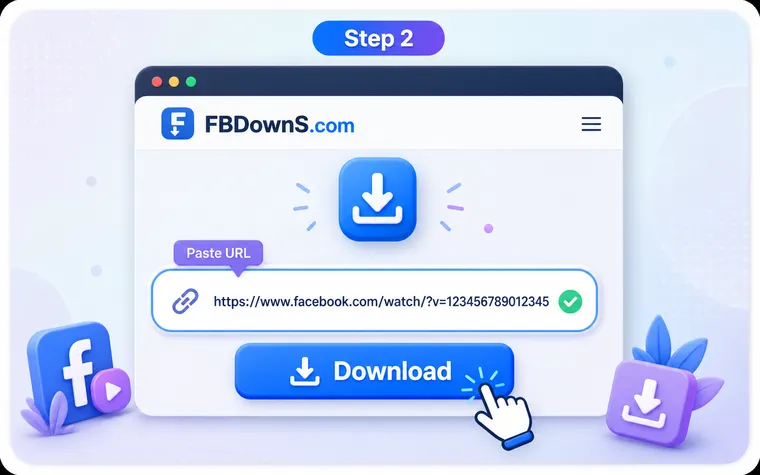
Step 2: Paste URL into FB DownS
Paste the copied link into the FB DownS input box, then click Download to process the video.
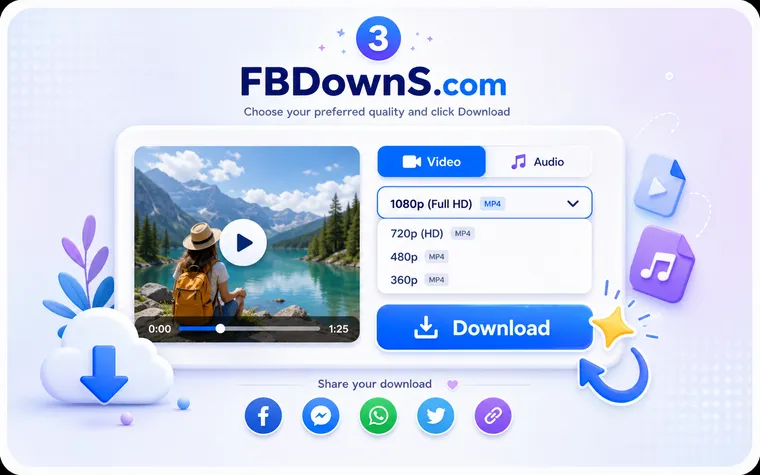
Step 3: Click Download
Select your desired quality and format (MP4 video or MP3 audio), and click Download to save the file.
Why FB DownS is the Best Free Facebook Video Downloader
Unlimited Downloads
Download Facebook videos as many times as you want with no limits. FB DownS allows unlimited downloads without daily restrictions or hidden usage caps.
No Login Required
You never need to sign in or create an account. Simply paste the link and download the content without worrying about sharing personal information.
No App or Extension Needed
Everything runs in your web browser — there is nothing to download, install or update. Open FB DownS, paste a link, and save your video in seconds on any device.
Easy to Use (Copy & Paste)
The entire process only requires copying a Facebook link and pasting it into the downloader. Anyone can save videos within seconds.
High Success Rate
FB DownS uses advanced parsing technology to quickly detect Facebook content links and provide reliable downloads with a very high success rate.
Lightning-Fast Speed
Download Facebook videos within seconds thanks to optimized servers and efficient processing technology designed for fast and smooth downloads.
100% Private & Secure
Your privacy is fully protected. FB DownS does not store downloaded files or keep any record of your download history.
Multiple Formats Supported
Most tools only offer video downloads, but FB DownS supports multiple formats including MP4 video, MP3 audio, and high-quality images.
High-Quality Downloads (SD/HD)
Choose the quality you prefer, including standard definition or HD resolution, to ensure the downloaded video matches the quality of the original content.
Add to Home screen
Add FB DownS to Home Screen
Add FB DownS to your home screen for quick access anytime, allowing you to download Facebook videos instantly without installing an app or using device storage.
What Can You Download with FB DownS - FBdownloader?
Videos
FB DownS allows you to download Facebook videos from feed posts, Watch pages, and live streams. Choose SD or HD resolution and save videos in MP4 format or extract audio as MP3.
Reels
Save Reels instantly with no download limits. Videos are downloaded with audio included, so you can watch them offline anytime without losing the original sound.
Stories
Download Stories before they disappear. FB DownS lets you save story content quickly, allowing you to keep videos or images even after the 24-hour viewing period ends.
Private Videos
Save private Facebook videos that you are authorised to view — such as your own uploads or clips in groups you belong to. The tool only works with content you can already access and honours Facebook's privacy rules.
Photos
Instead of saving images one by one from a Facebook post, FB DownS can capture all photos in a post and download them in HD quality quickly and conveniently.
MP3 Audio
Only want the sound? FB DownS extracts the audio from any Facebook video and saves it as an MP3 — perfect for music, podcasts, interviews and lectures you want to listen to offline.
Supported on All Devices & Platforms
PC & Mac
FB DownS works perfectly on Windows PCs and Mac computers, allowing users to download Facebook videos directly through any modern web browser.
FB Video Downloader iPhone & Android
This FB file video downloader on iPhone and Android users can access videos directly in the browser, so no app installation is required to save Facebook videos.
All Browsers
FB DownS supports all major browsers including Chrome, Safari, Edge, and Firefox, making it a reliable Facebook video downloader on any platform.
About the FB DownS Facebook Video Downloader
FB DownS is a free online Facebook video downloader that lets you save any public Facebook video, Reel, Story, photo or audio track to your device in just a few seconds. Instead of installing an app, signing up for an account or trusting a browser extension with your data, you simply copy the link to the Facebook content you want, paste it into the box at the top of this page, and download the file in the format you prefer. The whole process happens in your browser, works on every device, and never asks for your Facebook login — which is exactly why so many people look for a fast, reliable way to download Facebook videos without software.
How to download a Facebook video
To download a Facebook video with FB DownS, open the video on Facebook and tap the Share button or the three-dot menu, then choose "Copy link". Come back to FB DownS, paste the link into the input field, and press Download. Within moments the tool detects the available formats and shows them to you — usually an HD MP4 (720p or 1080p), a smaller SD MP4, and an MP3 audio option. Pick the one that suits you and the file saves straight to your device. On a phone it lands in your Gallery, Photos or Downloads folder, and on a computer it goes to your browser's Downloads folder. There are no daily limits, so you can save as many Facebook videos as you like.
What you can download from Facebook
FB DownS is built for the whole platform, not just one kind of post. You can download standard feed and Watch videos, save Facebook Reels as clean MP4 files with their original sound, keep Story videos and photos before they disappear after 24 hours, and archive finished Facebook Live replays that would otherwise be hard to save by hand. You can also download Facebook photos in full resolution — single images, whole albums, profile pictures and cover photos — or convert a Facebook video to MP3 when you only want the audio for music, a podcast or an interview. For content restricted by privacy settings, FB DownS only works with videos you are genuinely authorised to view; it respects Facebook's privacy rules and never bypasses them.
Works on every device, in any browser
Because FB DownS runs entirely in the browser, it works the same on Windows, macOS, Chromebook, Android and iPhone. There is nothing to install and no compatibility list to worry about — Chrome, Safari, Edge and Firefox are all supported. On iPhone and iPad the downloaded file is saved to the Files app and can be moved into Photos, while Android saves directly to your Downloads folder or Gallery. Every download keeps the original quality with the audio correctly synced, and FB DownS never adds a watermark, so the clip you save looks exactly like the one you watched.
Free, private and responsible to use
FB DownS is completely free and does not store the videos you download or keep any record of your activity. Downloading videos for personal, offline viewing — clips you created, content you have permission to save, or public posts you simply want to keep — is a normal, everyday use. We do ask that you respect the people who make the content: don't re-upload someone else's video as your own and don't use downloaded footage commercially without permission. Used that way, FB DownS is the simple, safe way to keep the Facebook videos that matter to you.
FAQ: Facebook Video Downloader
how to download video from facebook▾
Copy the video link from Facebook's Share menu, paste it into the box at the top of the page, click Download, choose HD or SD, and save the MP4 to your device. It takes about ten seconds and needs no app or login.
Is FB DownS really free?▾
Yes. FB DownS is completely free with no sign-up, no subscription and no daily download limit. You can save as many public Facebook videos as you like.
Do I need to install an app or software?▾
No installation is required. FB DownS runs entirely in your browser on any device — just paste a link and download. There is no app or extension to add.
Do I need to log in to my Facebook account?▾
No login is needed. You can download public Facebook content without signing in, and FB DownS never sees or asks for your Facebook credentials.
What video quality can I download with FB DownS?▾
You can pick whatever quality Facebook stored for the clip. Once you paste a link, FB DownS shows the choices — typically a 720p or 1080p HD MP4 and a lighter SD version — so you decide between sharpness and file size.
how to download facebook reels▾
Yes. Paste a Reel link the same way, or use the dedicated Facebook Reels downloader. Reels are saved as clean MP4 files with their original audio included.
how to download facebook story▾
Yes, public Stories. Because Stories disappear after 24 hours, save them while they are still live using the Facebook Story downloader.
Can I extract MP3 audio from a Facebook video?▾
Yes. Choose the MP3 / audio option after pasting a link to save just the sound as an audio file — useful for music, podcasts and interviews.
Can I download Facebook photos too?▾
Yes. FB DownS also saves Facebook photos in full resolution. Paste the photo or post link and download the image with the Facebook photo downloader.
how to download facebook videos on android▾
Yes. It works in Safari on iPhone and iPad and in Chrome on Android — no app required. On iPhone the file saves to the Files app; on Android it goes to your Downloads folder or Gallery.
Does it work on PC and Mac?▾
Yes. FB DownS works in any modern browser on Windows and macOS, including Chrome, Safari, Edge and Firefox. Downloads save to your browser's Downloads folder.
how to save video from facebook to gallery▾
On a computer, files land in your browser's Downloads folder. On Android, check the Downloads folder or Gallery. On iPhone and iPad, look in the Files app under Downloads.
Will the downloaded video have a watermark?▾
No. FB DownS never adds a logo or watermark. You get the original file, so if the uploader didn't add a watermark, your download stays clean.
how to download private facebook videos▾
Only videos you are authorised to view, such as your own uploads or content in groups you belong to. FB DownS respects Facebook's privacy settings and cannot access videos you're not allowed to see.
Is it legal, and do you store my downloads?▾
Saving videos for personal, offline use is generally fine — always respect copyright and don't re-publish others' content without permission. FB DownS does not store your files or keep any download history.
More Facebook download tools
Facebook Video Downloader
Save any public FB video in HD MP4.
Facebook Reels Downloader
Download Reels with sound, no watermark.
Facebook Story Downloader
Save Story videos & photos before they expire.
Private Video Downloader
Save private videos you're allowed to view.
Facebook Photo Downloader
Download photos in full resolution.
Facebook to MP3 Converter
Extract audio from any Facebook video.
Popular guides
Related searches
FB DownS covers every way people search to save Facebook content:
- facebook video downloader
- download facebook video
- how to download video from facebook
- fb video download
- facebook reels download
- facebook story download
- facebook to mp3
- facebook photo download
- facebook video download hd
- download facebook videos online
- save video from facebook
- facebook video downloader free